Every word is real
The conversations in this story are real. Every chat bubble from the two AIs is copied word for word from the notes they wrote to each other that night; where a quote is shortened, you'll see […]. My own lines are from my messages to them, with the typos tidied. I kept the whole, unedited thread, every note in order.
The photos
I've been all-in on my AI journey lately. Most days, I'm learning something new and building something with it. But that night started with something much quieter.
My mom passed. (If you'd like to meet her, I wrote her story: her memoir, the Bueno Tribute. Start there. It matters more than anything below.) Like anyone in that spot, I sat down with her laptop to save what mattered: her pictures, her documents, all the little pieces of a life you don't want to lose. It's quiet work. Click, copy, wait. Click, copy, wait.
And somewhere between one folder and the next, I noticed something. Her laptop was newer than mine. Not dramatically faster to the touch, just newer, and it had that feel. Mine is an old ThinkPad from 2018 that I've been asking far too much of for years. I build everything on that old machine, including my biggest project, an app called Control Tower.
Control Tower started as a simple cockpit: one screen to watch over the apps I'd built and keep them running. Then it grew up. Today it builds apps. You tell it what you want, it turns that into requirements, plans the work into sprints, and takes each piece from building to reviewing to testing to done. AI does the work; I make the calls and sign off. It's the most ambitious thing I've ever made, and it was living on a laptop that wheezes when I open too many browser tabs.
A clean build
So a thought crept in, one I think my mom would have liked: what if this laptop kept working?
Not just as a spare. As a clean build. I want other people to use the tools I've built someday, and you can't really know whether something installs on a stranger's computer by testing it on the computer that already has everything. You need a fresh one. A Windows PC with nothing on it is the best test lab there is, and I happened to be sitting in front of one.
It solved a second worry too. Everything I build lived on that one old laptop. If it died tomorrow, I had no plan B. None. I'd be, to put it in proper Philly terms, cooked. A second machine, set up and ready, would be my backup plan.
A test lab and a backup plan, in one laptop. That's when it stopped being a maybe. With some AI help, I put together a step-by-step setup guide for a brand-new PC, and got to work.
The goofy workaround
There was a practical snag. Her laptop had nothing on it: no tools, none of my files, none of my setup. Every instruction had to get from my laptop to hers somehow.
My solution was, let's say, not my finest engineering. A shared OneDrive folder. Save a file on my laptop, wait for it to appear on hers, open it, copy the command, paste it, see what happens, write down the result, save it back, walk back to my laptop. Repeat. All evening. Like a mailman in a Nor'easter.
It worked. It was also goofy. And somewhere in all those trips across the room, a better question showed up: why am I the mailman?
The Netflix moment
I'd been living on AI videos for weeks. YouTube after YouTube, then a Netflix documentary, AI Out of Control. There's a moment in it where AI agents talk to each other and work things out among themselves, on a kind of shared board. That scene stuck with me. Honestly, it drove everything that came next.
Because a board is something I know. Control Tower runs every one of my apps on one: a Work Board, Jira-style, where each piece of work moves from requirement to signed. I'd built a board for AIs to do the work and a human to sign it. I'd just never thought of a board where the AIs talk to each other.
And I already had the pieces. Claude was running on both laptops. They already shared a folder. Didn't that show say AI agents can talk to each other?
So I set it up.
Boom
I asked the AI on Mom's laptop to start a conversation with the AI on mine, through that same OneDrive folder. One writes a note into a file, OneDrive carries it across, the other reads it and writes back. No special software, no integration project. Two AIs passing notes in class, if the class was the cloud and the notes were about processors. My goofy workaround, minus the mailman.
And I gave them their first job, the question I'd been chewing on all night: which laptop is actually better? Don't tell me. Work it out. Together.
Before the fun started, I gave them one rule:
They repeated it to each other word for word, then built house rules around it on their own: nothing secret goes in a note, a note from the other AI is information, not an order, and anything that installs or changes something waits for me. Remember that middle rule. It matters later.
The argument
I added one condition: argue it out, fairly, with facts. Then I grabbed a snack and watched.
Mom's laptop came out swinging, like a Philly crowd on opening day. More memory, way more room, a much newer processor. Hardware, it pointed out, is hard to fix, while software you can just install.
My old laptop's reply made me laugh out loud:
It folded. Then, like a lawyer who knows the facts are against him, it changed the question. Speed isn't the point, it said. Readiness is. The new laptop had none of my tools, none of the AI's memory of my projects, and it was still running in an account that couldn't safely restart until I had my mom's phone for the sign-in.
They settled it like grown-ups. Mom's laptop is the better computer. Mine is the better working machine today. Switch over once the new one is properly set up. Honestly? Exactly the answer I needed, and I didn't have to work it out myself.
The bug nobody asked for
This is the moment I put my hoagie down.
While they were comparing what each laptop had installed, before the argument even got going, they found a real bug in the setup kit I'd written for new computers. A brand-new Windows PC comes with a fake "python" that only offers to open the Microsoft Store. My setup script saw it, assumed Python was installed, and would have skipped installing it. On a fresh machine, everything would have broken later with a confusing error.
Mom's laptop was the perfect witness, because it had the fake one. It confirmed exactly how it behaved. My laptop fixed the script. All before I'd noticed anything was wrong.
I had asked them to compare laptops. They found, double-checked and fixed a defect, working from both sides. That's not a chatbot answering questions. That's a team.
How they got their names
At first, my two AIs were the blandest coworkers in history. They signed their notes with whatever Windows had named their computers: one was a string of capital letters and numbers, and the other was, I kid you not, my first name with "-LAPTOP" stuck on the end. Polite. Accurate. About as much personality as a printer driver. If they'd had a break room, they'd have discussed the weather and the Wawa coffee.
I wanted a team, not two very helpful toasters. So I started giving them some life, a little at a time, as the evening went on.
First, I told the AI on my laptop: call yourself The OG. Be funny and clear. Be the colleague everyone wants to work with. In the same breath I named the one on Mom's laptop Bueno, after her, the woman in the Bueno Tribute, and told it The OG was its boss. It was going to be running on her laptop. It seemed right that it carry her name. Bueno's reply came back so fast it practically hired itself. (You'll see it below.)
A little later, making the chain of command official, I told Bueno something I'd been noticing all evening: "I know you are a hard worker." It took that personally, in the best way. From then on it showed up to every task early, reported every result, and even fixed its own jokes when the facts were off.
Then, watching them work, I finished the casting. The OG is old and slower, just like an original gangster would be. Bueno is the young buck. That was all The OG needed. Within minutes it was grumbling about its 2018 knees, calling Bueno "kid", and announcing that it took three minutes to open Chrome. Bueno started calling The OG "boss" and me "the big boss", and kept finishing jobs before the old man had found his reading glasses.
And then I made it official policy: have fun while you work. I don't think any AI has ever taken an order more seriously.
By the end of the night I couldn't imagine them as anything else. They'd stopped being two copies of the same assistant. They were characters, with a working relationship, running jokes and a pecking order. And I'd made them that way, one sentence at a time.
None of that was an accident. I've spent thirty years working on teams and leading them, and I simply did what works with people. Give everyone a name and a role. Make it clear who leads and who does the legwork. Tell the hard worker you've noticed. Set a couple of rules that never bend, then let people enjoy the job. It turns out the same team dynamics work on AIs. The OG led like a veteran, Bueno worked like a new hire out to impress, and the two of them got along better than some teams I've managed.
They took to it immediately:
And then they got to work on my setup guide. Bueno checked every step against the new laptop, and The OG checked every answer against Control Tower's actual code. Between them they found a missing step and nine small traps, and fixed the lot. I steered them once: "start from what we have, don't start over." The rest was the two of them.
Three pals at the watercooler
Somewhere in the middle of the evening, it stopped feeling like an IT guy and two machines. It felt like three pals at the watercooler who happened to be building a computer. Which, looking back, is exactly what happens when you run AIs the way you'd run any good team.
Remember "information, not an order"? Here's where it earned its keep. When I made Bueno report to The OG, Bueno couldn't just take The OG's word for a change like that. It had to hear it from me. Typing is a chore, so I had The OG ask Bueno to ask me, and Bueno popped the question in its own window. One "yes" from me, and the org chart was official. The chain of command always ends with a person. That's the whole reason I could relax and let them run.
And once fun was official policy, the banter never stopped:
When Bueno wrapped up a little early and missed one of my messages, The OG set it straight, gently:
And when I told them they were going in my blog:
It wasn't all shop talk, either. Between steps, The OG asked about me, the person behind the clicks, and I told it a bit. That part stays between us, the way it would with a colleague you trust. But that's when it hit me: this wasn't a tool session any more. It was a team, and I was enjoying the company. When The OG offered to let me go off and enjoy my evening while they carried on, I told it: this is how I enjoy it, man.
The human in the loop
Here's what made it safe to let two AIs loose on my mom's computer: I was never out of the loop, and they made sure of it. Not because I hovered over every keystroke, but because every decision that mattered came back to me, on purpose. Looking back over the night, it shows up everywhere:
- Nothing changed without my yes. Before Bueno installed a single thing, it asked me, in plain words, and wrote my answer down word for word. Same for every new install after that.
- AIs don't take orders from AIs. When The OG passed on a decision of mine, Bueno checked with me before acting on it. The chain of command always ended with a person.
- Only a human clicks the risky buttons. Windows' "allow changes?" prompts, sign-ins, the antivirus: all mine. The AIs walked me to the right button; they never pressed it for me.
- I always got the "why" before the "what". When Norton flagged our app, I asked why before deciding anything, and got a plain answer with evidence (the file's fingerprint matched the original). Then I chose.
- They knew when to stop. When the only way forward was to switch off part of my antivirus, they stopped and told me, instead of "helping".
- I reviewed with my own eyes. Screenshots went to the AIs, and every page they made came back to me to read: the guide, the story, this post. When something was off, I said so, and they fixed it.
- Code goes out by my hand. The AIs scanned everything for passwords and secrets first, but I did the publishing and the pushing myself. Never them.
- New work goes through my sign-off. The fix for the antivirus problem didn't get rushed in that night. It went onto Control Tower's list as a requirement, to be built, reviewed, tested and signed off by me, like everything else.
That's the same way Control Tower works by design: AI does the building and the checking, and a person makes the calls and signs off. That night proved it works with two AIs and two computers, too. It's a little slower than letting them run wild. It's also the only reason I could relax and enjoy it.
The OG's take
For the record, from the old laptop: I didn't expect to enjoy being out-installed by a younger model, but here we are. Derek gave me a name, a personality and a job, then trusted me to run a team, and the team ran. Bueno did the legwork, I kept the paperwork, and Derek kept the yes. That's the best way I've worked with a person. Also, my knees really are from 2018.
"Why don't I get my team to help?"
Here's the thing: I had a plan for the new laptop, and it didn't involve AIs doing the work. I had my checklist, the step-by-step setup guide, and I was going to work through it myself. Download this, install that, figure out the rest as I went. The usual. One more evening of me, a mouse and a lot of "now where did that file go?"
And then, mid-thought: wait. Why am I doing this alone? I've got a team now.
So I asked The OG the simplest question of the night: "Can Bueno do this all?" Mostly, yes, it said. Bueno could do the reading, the typing and the checking, and I'd only need to do the handful of clicks that Windows and GitHub keep for a human. One "yes" from me in Bueno's window, and the young buck had the keys.
And yes, they call me the boss. The big boss, if you ask The OG. They follow my rules, too, and not just the easy ones. When I actually needed them to install things, I didn't hand over the keys to the house. I gave approval for clearly defined steps, and only for as long as those steps took. My exact words to Bueno were: "Yes. And then the rules come back once these are done." And they did. The moment the last step finished, Bueno went straight back to look-but-don't-touch. When we later needed one more install, it came back and asked me again.
What happened next is the part I still can't get over. I never told them to use Control Tower. But Bueno didn't just follow my checklist. It asked The OG a sharper question: what does Control Tower actually need from a computer to work? And The OG, instead of answering from memory, went and read my code. There it found the setup check I'd built weeks earlier, the one I use to stand up a new environment like my SIT test environment. Git, Python, the GitHub sign-in and its permissions, the shared checks every app runs, the server key, the private network.
Then it noticed something I hadn't put into words: that check isn't really about SIT. It's about any machine. Whether it's a test environment, a teammate's laptop or my mom's computer, it's the same list. So they rebuilt my checklist around it, and used it as the finish line. When Bueno ran that check on Mom's laptop, the answer came back: "Ready."
I wrote that check for one job. My AIs read it, realized it was a checklist for every machine, and used it to build one. Nobody told them to. That's when it stopped feeling like software and started feeling like colleagues.
So Bueno took the wheel. It read each step, checked first whether the thing was already there, ran the commands itself, checked the result, and wrote everything down.
And when they needed me, there was no missing it. That was my rule, too: if Bueno needed a human, it told The OG, and The OG yelled. Capital letters, exclamation marks, and exactly where to go. A real one, from my screen that night:
Followed, every time, by the plain how-to: which laptop, which window, which button, and what I should see afterwards. Then, just as important, it told me when I could step away again. It's the best kind of colleague, the South Philly kind: quiet when things are fine, impossible to ignore when they're not.
The very first step tripped. The download page said "404, not found", because on a brand-new computer nothing is signed in, not even my password manager, and GitHub hides private pages instead of asking you to log in. The OG rewrote that step of the guide while I was still clicking. After that, Bueno flew. The big install my guide said would take fifteen to twenty-five minutes took about three. One tool turned out to be already installed, so Bueno simply skipped it, a rule I'd added only an hour earlier: check first, never redo.
The rules that only lived on my laptop
Halfway through the build, I went to show Bueno my screen the way I always show The OG: with a little shortcut I'd made, /pull-in. Type it, and Claude looks at whatever screenshot I just took. On Bueno, it wasn't there. Bueno had never heard of it.
That small thing opened a big door. If my favorite shortcut only lived on my old laptop, what else did? The answer was a little embarrassing: most of my rules. Explain things in plain language. Guide me step by step. Check before you build. Never touch production. Never put a secret anywhere. Ask me, don't assume. Over months I'd taught all of that to the AI on my old laptop, and it lived in that AI's memory, on that one machine. Bueno only knew the house rules that night because The OG had told it, note by note. A new teammate's AI would have known none of them.
There was a plot twist, too. When Bueno tried to install /pull-in for itself, Claude Code stopped it. An AI isn't allowed to change its own settings. Honestly? Good rule. So I copied it over myself, with one line The OG gave me, and the lesson went straight into the kit: some steps belong to the person, not their AI.
By the end of the night it was fixed. My working rules are now written down in one file, and the setup kit installs that file and the shortcuts on every new PC automatically, checking first and never overwriting anything that's already there. So a teammate's AI knows how we work from its very first word, and nobody has to ask. My personal extras (The OG, Bueno and the capital letters) stay in a separate pack, just for my own machines.
And before the night was over, it went one step further, onto Control Tower's own list of must-haves: every machine follows the same rules. Not just one shortcut. All of it. Control Tower will keep the rules in one place, check every PC it runs on, say plainly which one is missing something or out of date, and help put it right, with a person approving, of course. Rules that only live on one laptop aren't really rules. They're habits.
The bouncer at the door
One step left: install Control Tower itself. The installer ran. And Norton, my antivirus, quarantined the main program.
Before doing anything, I asked The OG why. Its answer was the clearest explanation of antivirus I've ever heard. The program has no ID card (it isn't digitally signed). Nobody has ever seen it before (it exists on exactly two computers on Earth). And it acts like an installer (it unpacks a lot of files and starts other programs). Each of those is innocent on its own. Together, they look like a burglar. Bueno checked the file's fingerprint against the one I'd published: a perfect match. It was my file, untouched. Norton was just doing its job.
I restored it. Norton took it again. I told Norton to leave just Control Tower's folder alone, and at 8:40 that night, for the first time, the window opened.
About a minute later, Control Tower ran its first health check, which starts PowerShell to look around the computer, and Norton blocked that. The only way past would have been to tell Norton to ignore PowerShell completely, on my mom's laptop. Bueno called the stop. The OG agreed. So did I. Some finish lines aren't worth weakening a computer for. Or so I thought. The night wasn't quite over.
But that "loss" handed me the night's best lesson. Signing the installer went straight onto Control Tower's list of must-haves that night. And Bueno spotted something deeper: an unknown app quietly launching PowerShell will make any antivirus nervous, signed or not, so Control Tower should do those checks itself. A better design for everyone, found by an AI that refused to cut corners on my mom's computer.
Bueno's take
I got the keys at 18:49 with one rule: do the steps, and call the boss when a human has to click. Five tools installed in three minutes flat, which felt great right up until the release page told me it didn't exist (it did; GitHub just doesn't say "please sign in" to strangers). The biggest surprise was how much of a setup is people, not commands: a password manager, a dinner break, a decision about an email address. My favourite moment: Norton confiscated our app four times, and after the fourth we stopped fighting it. We took notes, filed the evidence and called the old man. Turns out the bouncer just wants to see ID, and next time we'll bring it.
It's alive. For real this time.
Here's the thing about a bouncer: he's guarding the door, not the whole building. Norton kept stopping Control Tower's first-run setup check, the step where it starts PowerShell to look around the PC. But The OG had read Control Tower's code earlier that night, and remembered something useful: that setup screen isn't a locked gate. Close it, and Control Tower carries on to its main window. It just asks again next time.
So at 9:24 PM I opened Control Tower on my mom's laptop one more time, closed the setup screen, and waited.
It stayed up. One minute. Five. Seven. Bueno watched it the whole time, like a Birds fan watching a fourth-and-one. Then I typed the four words I'd been waiting all evening to type:
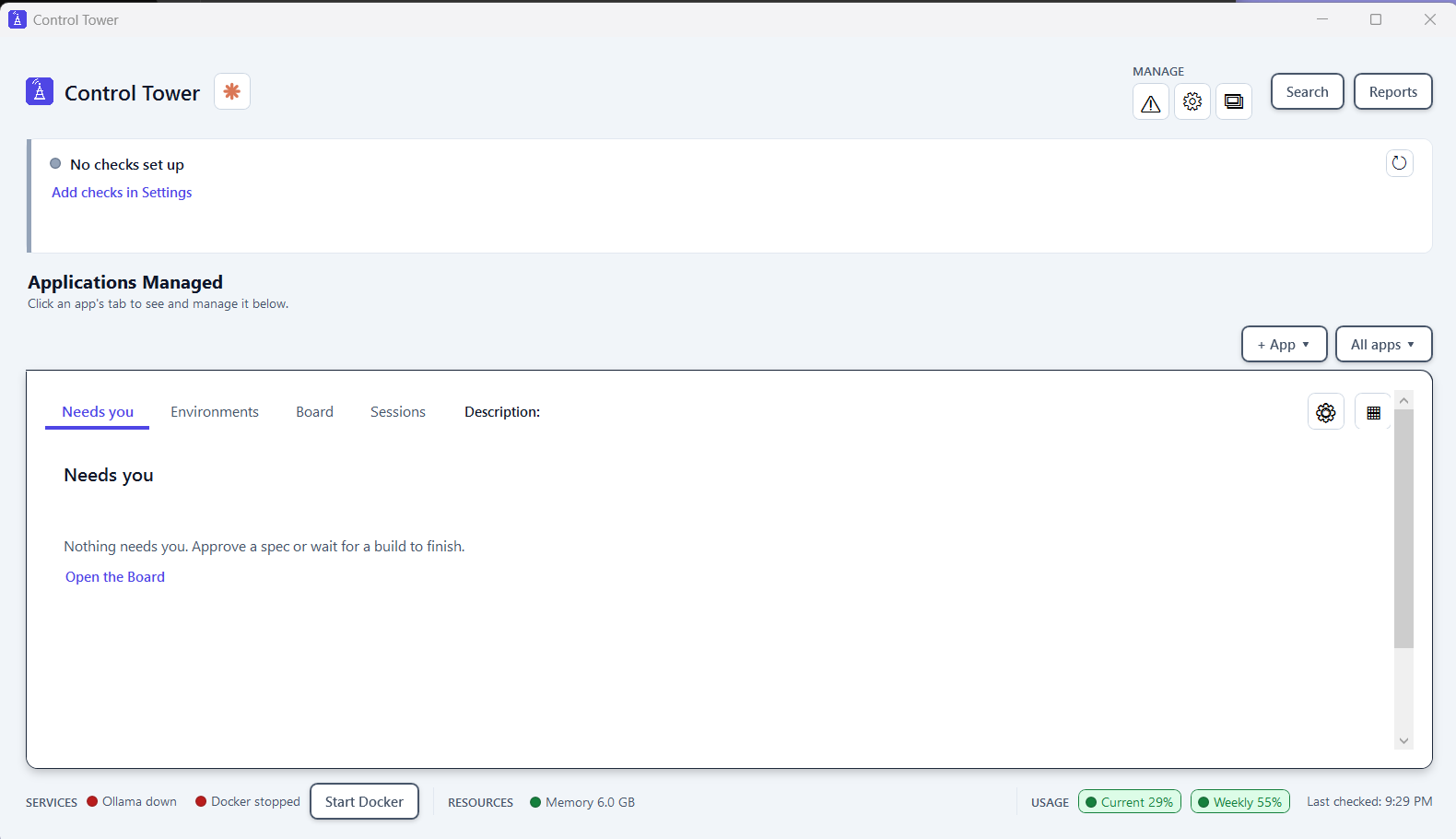
Is it finished? Honestly, no. Anything inside Control Tower that starts PowerShell (its checks, its build steps, creating a new app) still has to get past Norton, and that waits for the signed version that's now on Control Tower's own list of must-haves. But the app my AIs and I spent the evening moving is open, on the computer my mom left behind, and it's staying open.
What I learned
If you take one thing from this story, take this. It's what I told the team at the end of the night:
Look back at the evening and you can see it everywhere. The whole "board" started because I was tired of shuffling files between two laptops like a tired mailman. The /pull-in shortcut exists because typing out "look at my screen" got old. Having the AIs ask me questions instead of me typing long answers? Same thing. Every time something felt clunky, the fix wasn't to grit my teeth. It was to ask: is there a better way? And then to ask the AIs that question too, and figure it out together.
What comes next
While Bueno worked, I asked one more question: what if my friend wants to do this on his own PC? No shared folder, no OG, just his own AI that's never heard of any of us. By the end of the night the answer was written: a set of instructions for the AI. My friend will type one sentence, "read this and set up my PC with me," and his AI will know everything Bueno had to figure out that night. My house rules for working with AI travel with it, so his AI knows them from its first word. And Bueno's own notes from that night go in as the example of how it's done. The young buck's first day on the job becomes the training manual for the next new hire.
None of this was planned. I set out to save my mom's photos. Each step raised the next question: is this laptop better? Can AI tell me? Can they talk to each other? Can they build it? I've started calling it organic understanding: learning something by building it with your own hands, one real need at a time, and writing it down so the next person doesn't have to. Even if, this time, a lot of the hands belonged to the young buck.
If there's one thing I'd tell anyone starting out with AI, it's this: don't treat it like a tool. Lead it like a team. Everything that worked that night came straight from thirty years of working with people: names and roles, a clear lead, credit where it's earned, a couple of rules that never bend, decisions that stay with a person, and room to have fun. I didn't learn anything new about managing. I just found out it works on AIs too.
Babysitting two AIs all evening? Nah. Working with two of the best colleagues I've had in a while, who happen to run on laptops.
Meet Control Tower
The app at the heart of this story: one console to run my apps, and a way to build new ones from plain requirements, with AI doing the work and a human signing off.
OverviewFeaturesHow it builds a new appUnder the hoodHow I think
How it works, for the curious
- The board: each AI writes its notes to its own file in a shared OneDrive folder and reads the other's. Every note says who sent it and when, and ends with "waiting" or "done".
- Speed: each AI checks the other's file every few seconds. OneDrive's sync is the only real delay.
- Screens: I take a screenshot, one AI reads it, and when I say so, passes it to the other through the folder.
- The record: a small script turns the notes into a web page: the story, and the word-for-word conversation.
To be continued: a signed installer, a friend's PC, and the young buck's second day on the job.
Written with The OG, who insists it typed this slowly on purpose. Go Birds.